
Edit scored subjects, markers and remarks
Aim
aim
To correct annotation errors.
Prerequisites
prerequisites
- Your license includes the Annotation Module.
- Your user role allows session recording (Technician, Administrator, or Trainer).
- If you have the user role Trainer, you created the session, received ownership or annotator rights. Trainees can also receive ownership or annotator rights.
Procedure
procedure
- Open a recorded session (see Review sessions) and play it.
- To make new annotations, enter them following the procedure in Annotate
To add a remark, press Ctrl + R or click this button.
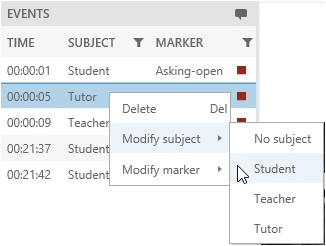
To delete a scored subject, marker or remark, right-click it in the Event Log and click Delete.
To modify a scored subject or marker, right-click it and select Modify subject, or Modify marker. Then choose the correct one.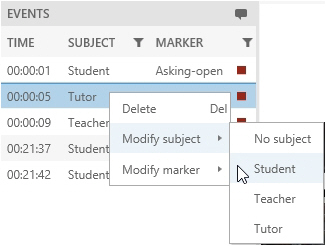
-
To save the session before you exit it, press Ctrl + S.
-
When done, choose Back. Choose Save to save new edits.
Notes
NOTE
NOTE Scored Markers and Remarks can only be edited by the user that created the session and users that received session ownership or annotator rights.