
Important notes about USB
USB 2 and 3 ports
The supported USB devices are all USB 3 devices and need to be connected to a USB 3 port. You recognize USB 3 ports by a double-S in front of the USB icon. Some USB 3 ports and connectors have blue labeling.
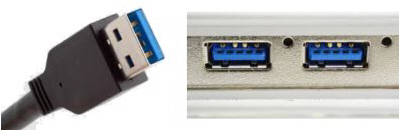
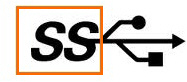
The Dell Precision T3640 desktop PC sold by Noldus IT has both USB 2 and USB 3 ports. The Dell Precision 3551 mobile workstation only has USB 3 ports.
USB hub
Do not connect your cameras to a USB hub. If you run short of USB connections, connect your license key, keyboard or mouse to a USB hub and connect your USB device directly to the USB port on your computer.
Cable length
USB devices can be connected to the computer without an amplifier with a cable of 5 m. For every subsequent 5 m, an amplifier must be used each. In theory, when using a standard resolution, the cables could be extended this way to 30 m. However we know that not all devices support this.
When do I need a USB camera?
USB cameras are very easy to use. However, the settings may be limited, fo rexample, many USB cameras have fixed zoom. A USB camera may be perfectly suitable for a usability study in which you film a person sitting behind a computer. A USB camera also works very well to create video files for FaceReader. On the other hand, when you need to create a video file of a person further away from your camera, a USB camera may be less suitable.
For videos with accurate time information, needed for EthoVision XT, you need a high-quality USB camera.
Supported USB cameras
- Basler acA1920-155um
- Basler acA2040-90uc
Logitech BRIO
Other USB cameras may also work. However, it could be t.hat you have to change the Color space to MJPG. See Show frame rate, resolution and format
Other supported USB devices
The following other USB devices are supported with MediaRecorder:
Logitech BRIO
Logitech was tested on the Dell Precision 3551 mobile workstation with the USB 3.0 ports that are by default present in this notebook.
Tested setups with EthoVision XT
The table below shows the maximum supported (1) resolution, (2) frame rate (fps), (3) number of devices and (4) recording time (hours) and (5) whether the test has been carried out on a desktop PC (Dell T3640) or a laptop (Dell 3551)
|
|
Device |
Resolution |
Frame rate |
No of devices |
Recording time |
Desktop or laptop |
 |
Basler acA1920-155um |
1920 x 1200 1920 x 1080 |
60 |
1 |
0.5 |
D |
 |
Basler acA2040-90uc |
2040 x 2046 |
5 10 25 50 |
1 |
8 |
D |
|
|
Basler acA2040-90uc* |
2040 x 2046 |
25 |
1 |
1 |
D |
|
|
Basler acA2040-90uc** |
2040 x 2046 |
25 |
1 |
48 |
D |
|
|
Basler acA2040-90uc |
1920 x 1200 |
60 |
1 |
10 |
L |
* Tested with output quality settings “EthoVision”“EthoVision” and “DanioVision”“DanioVision”.
** Tested with output quality setting “EthoVision”“EthoVision”.
Tested setups for use in The Observer XT - portable set-up
The table below shows the maximum supported (1) resolution, (2) frame rate (fps), (3) number of devices and (4) recording time (hours). Tests were done on a Dell 3551 notebook
|
|
Device |
Resolution |
Frame rate |
No of devices |
Recording time |
 |
Logitech Brio (separate videos, Picture-by-picture & Picture-in_picture, camera audio only) |
1920 x 1080 |
30 |
2 |
1 |
|
|
Logitech Brio |
4096 x 2160 |
10 |
1 |
0.5 |

Logitech Brio + Epiphan DVI2USB
(separate videos, Picture-by-picture & Picture-in-picture, line-in audio)
1920 x 1080
30
1+1
1
Logitech Brio + Epiphan DVI2USB
(separate videos, Picture-by-picture & Picture-in-picture, Logitech Brio microphone)
1920 x 540
30
1+1
1
Notes
- When using the Logitech Brio
cameracamera, you have to change the Color space to MJPG. See Show frame rate, resolution and format. - With multiple USB 3 cameras it takes a while before they become visible in MediaRecorder as it takes time for USB 3 cameras to initialize.
- Encoding the video stream of USB 3 cameras requires quite some processing capacity, which increases power consumption. If you use the supported devices on our recommended laptop, be aware that after 1 hour recording the battery level drops from fully charged to 45%.