# Save PTZ presets
### aim
To save the new camera view so that you can return to it easily.
### prerequisites
nYour user role allows session recording (Technician, Administrator, or Trainer).
nYou have opened a location.
See [Select locations for recording](https://bookstack.noldus.com/link/735#bkmrk-page-title)
nThe camera can Pan, Tilt, and Zoom. Ask your colleague who manages the Viso set-up whether this is the case.
See [Select locations for recording](https://bookstack.noldus.com/link/735#bkmrk-page-title)
### procedure
1. Hover with your mouse over the camera image and click the PTZ button on the toolbar.
[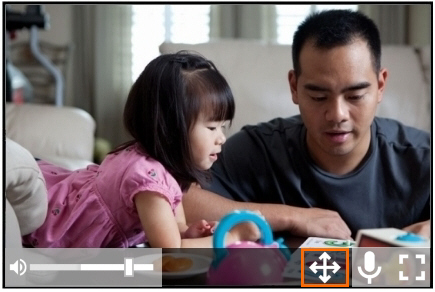](https://bookstack.noldus.com/uploads/images/gallery/2023-12/T0w5YNpyd8i4wLJQ-image.png)
This opens the PTZ preset menu. The buttons shown below appear.
[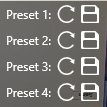](https://bookstack.noldus.com/uploads/images/gallery/2023-12/66z8dlSmLbSeTKmF-image.png)
2. To save a camera position, click one of the save buttons.
[](https://bookstack.noldus.com/uploads/images/gallery/2023-12/iDsVuIT5hGUrNFDe-image.png)
##### To return to a PTZ preset
Click one of the arrows to return to a PTZ preset.
[](https://bookstack.noldus.com/uploads/images/gallery/2023-12/e3sXLCrw28dxzpQ0-image.png)
##
**NOTE** The PTZ presets are stored per location. So if you or another user opens a location with Viso on another computer, the same pr esets are present. You can store four presets per location.
**NOTE** See [Record sessions](https://bookstack.noldus.com/link/767#bkmrk-record-sessions) in [Keyboard shortcuts](https://bookstack.noldus.com/link/767#bkmrk-page-title) how to manage the PTZ menu with your keyboard.