# Import sessions directly
### aim
To import Viso sessions in The Observer XT. This makes use of the Noldus network communication protocol N-Linx.
### prerequisites
- You have a license for The Observer XT 13 or a newer version.
- The computers with Viso and The Observer XT are in the same network and set up for communication with N-Linx. The procedure to set this up is present in the Viso Setup Manual.
- You recorded the sessions (Trainer), received session ownership or annotator rights or invitations to view the sessions or your user role is Administrator or Technician.
### procedure
1. In The Observer XT, choose **File > Preferences**.
2. Open the tab **Viso settings.**[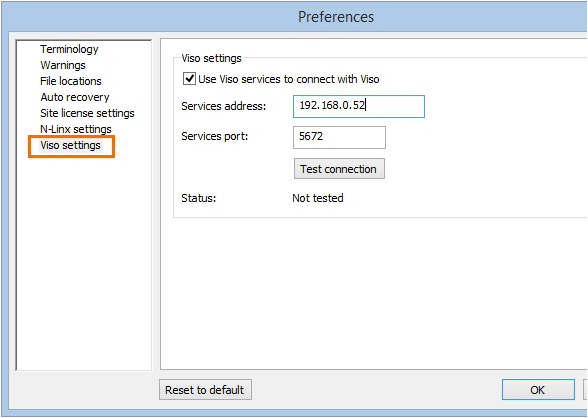](https://bookstack.noldus.com/uploads/images/gallery/2023-12/5ThagZRhrjb2birJ-image.png)
3. Select **Use Viso services to connect with Viso**.
4. In the **Services address** field, enter the computer name or IP address of the Viso Services computer. Ask your colleague who manages the Viso set-up for the details.
5. In the **Services port** field, leave the default port number 5672.
6. Click **Test connection**. If The Observer XT computer finds the Viso Services computer, the text **Connected** appears. Click **OK**.
7. Create a new project or open an existing one (**File> New/Open Project**).
8. Choose **File > Import > Viso Sessions**.
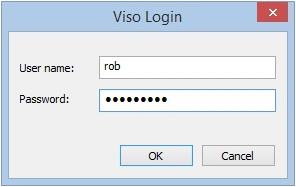
9. Enter your Viso login details.
**NOTE** If you are logged in in Viso, log out first. You can only import the sessions that you are allowed to view.
[](https://bookstack.noldus.com/uploads/images/gallery/2023-12/XuPXUX5gHuv8yhXU-image.png)
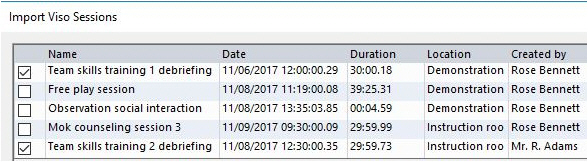
10. Select the sessions and click **Import**.
[](https://bookstack.noldus.com/uploads/images/gallery/2023-12/gsnxGLUBTEbos4XX-image.png)
**NOTE** Each session is imported as a separate observation. The videos are copied to the Video Files folder of The Observer XT. Markers are added to the coding scheme and remarks appear as comments in the Event log (see also [How Viso annotations appear in The Observer XT](https://bookstack.noldus.com/link/764#bkmrk-page-title)). The observation is named after the imported session, with the location name and the date and time the session was created added to the filename.
**NOTE** If you have a license for The Observer XT 12.5 or earlier, you cannot import sessions directly into Viso. You must [Export sessions in Viso and import them in The Observer XT.](https://bookstack.noldus.com/link/763#bkmrk-page-title)