# Change the annotator
### aim
To assign the role of session annotator to another user, for instance, a colleague or one of your students.
### prerequisites
- Your license includes the Annotation Module.
- You created the session or received session ownership or you are a Technician or Administrator.
### procedure
1. Open the **Sessions** tab to view the list of all the sessions.
2. Right-click the appropriate session and select **Change annotator**.
[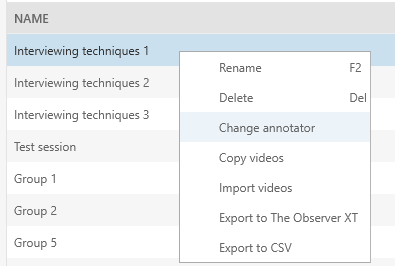](https://bookstack.noldus.com/uploads/images/gallery/2023-12/ZjmajTnFgjDh3uKh-image.png)
3. From the drop-down list select the name of the person who you want to assign the role of annotator to and click **OK**. By default, the person who recorded the session is the annotator.