# Select correct power options
## Aim
To make sure the computer shuts down properly.
Background information
On computers with Windows 10, by default the computer resumes rather than restarts after shutdown. This can cause problems with MediaRecorder and associated software like The Observer XT.
Therefore, we recommend to make sure that the computer really shuts down.
## Procedure
1. In the Windows start window with apps, type **Power options** and then click the **Power options** tile.
2. Choose **Choose what the power buttons do**. [](https://bookstack.noldus.com/uploads/images/gallery/2023-11/YrMd7kVpC7YDJObS-image.png)
3. Click **Change settings that are currently unavailable**. [](https://bookstack.noldus.com/uploads/images/gallery/2023-11/mFGRb97qN4kse2p2-image.png)
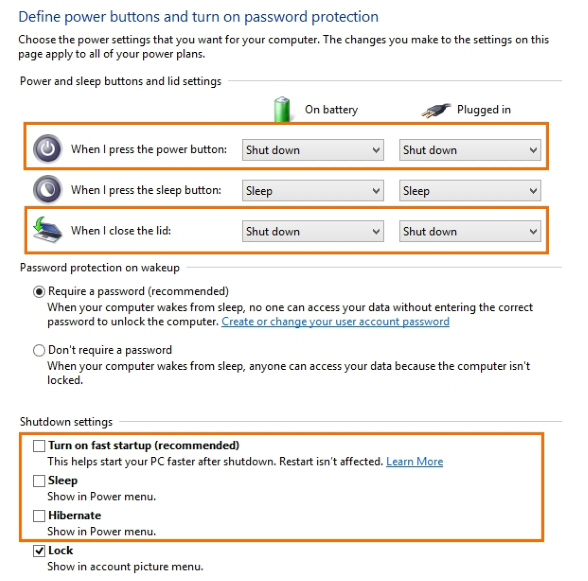
4. Select the following options:
When I press the power button – Shut down.
When I close the lid – Shut down.
Under **Shutdown settings** deselect the checkboxes **Sleep**, **Hibernate**, and **Turn on fast startup (recommended)**.
[](https://bookstack.noldus.com/uploads/images/gallery/2023-11/c9Gc7a25QjlhTd3T-image.png)