# Install the USB 3 camera driver
## Aim
To install the software that allows communication between your camera and the operating system of the computer with MediaRecorder.
## Prerequisites
- You have the Basler USB 3 camera.
- You have installed the USB 3 interface card.
See [Install the USB 3 interface card](https://bookstack.noldus.com/link/502#bkmrk-page-title)
- You carried out the prerequisite steps before installing MediaRecorder.
See [The steps to install MediaRecorder](https://bookstack.noldus.com/link/408#bkmrk-page-title) in [Installation](https://bookstack.noldus.com/link/409#bkmrk-page-title)
- **IMPORTANT** If you upgraded from a previous MediaRecorder version and had old drivers for the camera installed, you uninstalled them first.
### To uninstall old drivers
1. Open the **Control Panel**
2. Choose **Program and Features.**
3. Select **Pylon Camera Software Suite** and choose **Uninstall**.
### Install the camera drivers for the Basler USB 3 camera
### If you did not yet install MediaRecorder
1. Download the installation files from my.noldus.com, and extract the contents.
2. Browse to the file **MediaRecorder 6 Setup.exe** and double-click it.
3. In the **Drivers and tools** field, choose **Basler USB Camera driver** - pylon \[version number\].
4. Click **Next**, accept the License Agreement and click **Install**.
### If you already installed MediaRecorder
Follow the instructions in [If you did not yet install MediaRecorder](https://bookstack.noldus.com/link/503#bkmrk-if-you-did-not-yet-i) and choose Modify in the installation window.
Alternatively:
1. Download the necessary files from my.noldus.nl and extract the contents.
2. Browse to **Drivers\\Basler\\7.1.0.25066
**
3. Double-click the file **Basler\_pylon\_7.1.0.25066.exe**.
4. Agree to the terms in the License Agreement.
5. In the Profiles window, choose **Camera user** and click **Next**.
6. As camera type, choose **USB** and click **Next**. [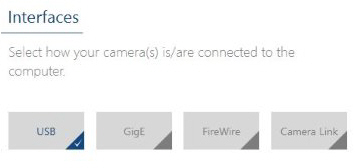](https://bookstack.noldus.com/uploads/images/gallery/2023-12/cV211hvdUCu3yXw8-image.png)
7. Optionally, change the location where the camera drivers are stored and choose **Next > Install**.
### To uninstall old drivers
1. Open the Control Panel
2. Choose **Program and Features**.
3. Select the Basler camera driver and choose **Uninstall**.