# Install MediaRecorder and device drivers
## Aim
To install MediaRecorder and, for some recording devices, their drivers.
## Procedure
**IMPORTANT** - **If you have an older version of MediaRecorder** - Uninstall MediaRecorder 6.0 and older versions before you install MediaRecorder 6.5.
1. Download the installation files from my.noldus.com, and extract the contents.
2. Browse to the file **MediaRecorder \[Version number\] Setup.exe** and double-click it.
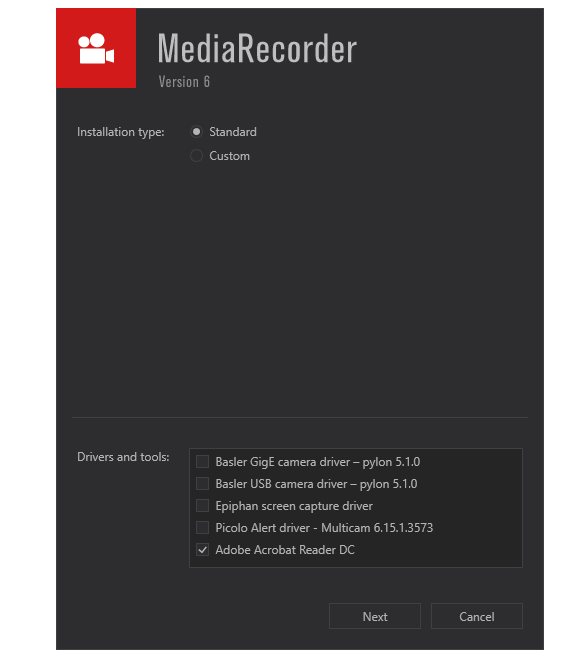
3. We recommend to choose **Standard** as Installation type. Choose **Custom** only to change the location where the program is installed.
[](https://bookstack.noldus.com/uploads/images/gallery/2023-11/bXoXxAaDnroZVAqX-image.png)
4. In the **Drivers and tools** field, choose the driver of your video device.
5. Click **Next**, accept the License Agreement and click **Install**.
The following setup prerequisites are installed automatically before MediaRecorder is installed:
- Sentinel Run time — Needed for correct functioning of your hardware key.
- Noldus LeadTools Package 21.
- Noldus MediaLooks Proxy Filters 2.1 — Needed for screen capture of the monitor of the computer with MediaRecorder.
- Medialooks Screen Capture 2.0.3 — Needed for screen capture of the monitor of the computer with MediaRecorder.
- Microsoft .NET Framework 4.7.1 —To run MediaRecorder. This program is installed only when not already present on the computer.